A Macbook setup that works (for me)
Linux intro
In the olden days of yore, I was a wee bit lad when I started using Linux full time. As most Linux users I started with a simple pre-made distribution which came with everything set out of the box. That distribution was Ubuntu. At the start, I was really satisfied with it. However, one faithful day I got hit by a RICE bug.. as well as all that came with it. It was then, that my Linux machine became a ginormous time-sink, playground, learning tool and sometimes a pain in the ass.
RICE, RICE baby
As most users that are a bit weird and need to have everything matching I initially started to experiment with themes. Themes which would change every little bit of my machine, so all colors and patterns match, and everything is in unison. This was grande at the start, since I was still mostly using GUI options as my little noob mind couldn’t yet comprehend the awesomeness and merit of configuration files. However, one glorious day I’ve found /r/unixporn in which people shared their setups, and I was amazed by their ideas and ingenuity. One of the first things I found while scrolling through the subreddit was i3 and various polybar/sketchybar setups. That kind of ricing, which involved a functionality shift enamored me. I was in love with the terminal from day one (although only using basic commands), but to think that I could use my computer with keyboard only, it was an idea which quickly left roots in my mind.
Hopping away
After finding i3 and getting the hang of it over my Ubuntu distribution, the distro hopping started. No distribution was good enough since it was not minimal enough, but I was still scared of the big ol’ Arch (btw). I did find my home for the next few years in the next best thing - Manjaro. My personal setup was changed more times than my socks in those years, and every few months I would re-install - either due to breaking something or due to finding something less bloated, new and flashy. One thing though that all my distro’s had in common, was that in the end I always landed back on i3. Especially once I reached Arch btw.
After finishing college and starting my job, I had to have a short stint on Windows, but took the Linux way out as soon as I could. Linux usage was a-ok in a work related environment, but due to increasing security measures, it did start to feel a bit bloated and slow. As such, I did start glancing towards Macbooks and in the end once the M1 Mac got released I took the plunge and got an Air. I was using it for a bit as a personal machine and soon after, I migrated onto it at work as well. At first I was skeptical, but the base of all my usage was there and I could - in a way - rice it and get it functional.
Macbook - getting it functional
Tiling window manager
i3 is not a thing on Mac which was quite a bummer since it was my bread and butter for a long time. However, I found Yabai soon after and managed to replicate my setup or at least get it close to the usage I was used to and was productive in.
Mouse usage was still present a bit more than I would like, but that is a MacOS sort of thing. Yabai sated my thirst for window management for quite a bit, but as always I managed to find something better and something new.
Aerospace beta started, and I jumped right on that bandwagon. I didn’t think we’d be able to have something better than Yabai on a Mac, but alas I was proven wrong. Aerospace is awesome, and as far as I’m concerned, if that gets taken away, my Macbook goes with it. Using MacOS without tiling window managers is a no-go in my book, with all the random window placement, whooshes (four finger swipe to get mission control) and other random - eye searching stuff (sigh).
Main idea of having a tiling window setup with preset windows is that I always know what I am looking for, and how to get there as fast as possible with as little thought as possible. Since the beginning I’ve always used more or less the same spaces setup (it evolved a couple of months back but nothing major has changed).
Default setup from the olden days of yore
- Browser
- Terminal
- Space for temporary stuff
- Socials and messaging
- E-mail client
- Media
- Space for temporary stuff #2
Default setup today
All of the above are still in effect. However, Aerospace brought some character named workspaces for me.
- p - password manager (using it real often due to a limitless number of accounts at my job - Network Engineer)
- a - ASDM gets it’s own space due to being shitty (Cisco peeps will know it)
- f - very rare usages of Finder (Yazi rocks, and why would I want to click)
- m - space for a second browser due to some random usages but mostly present and needed
Themes
I’m an old soul and I like my terminal like I like my coffee, bitter and bland. Just kidding, I do like to keep it quite minimal, but as I said - theme needs to match everywhere. After a lot of soul searching and light vs dark wars in my mind, I did land on Catppuccin Mocha theme (yes, yes.. real unique and there’s definitely not a million people using it). However, the pastel colors and dark background really suits my eyes.
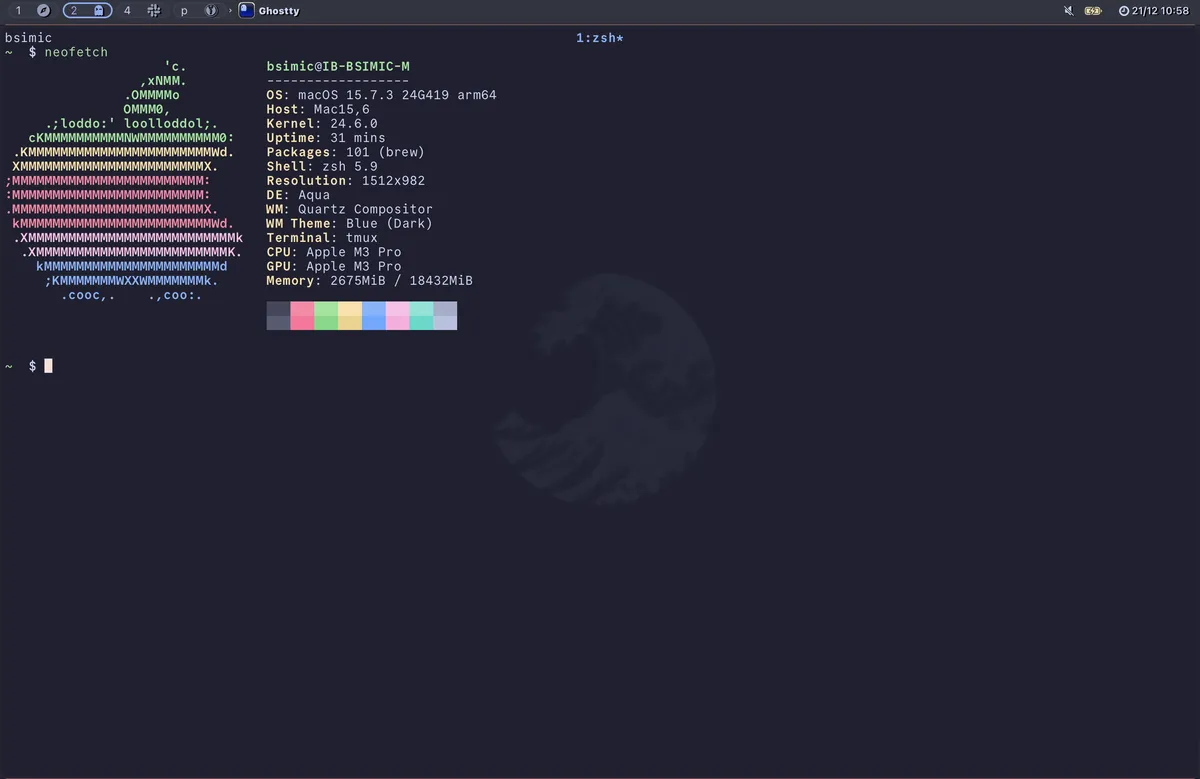
The Terminal
My choice of a terminal emulator, was iterm2 once I landed on Mac, as it was the most recommended one around. However, it quickly gave way to Wezterm which was my longest used terminal until Ghostty (or ghost titty as one of my friends call it) got out of closed beta. I was following ghostty while it was in closed beta and could not wait for it to get released. Mitchell Hashimoto is a well known individual and I knew that something he created will perform great, and will have a nice community and following behind it. Turns out, I was right, and I’m still rocking Ghostty and will continue to do so since it performs greatly.
Editor wars
Well if you look at the domain, my choice of a mouseless life and bio you can conclude that I am a big proponent of vim. I don’t want to get into the vim vs emacs war and all that, since I know who the winner is for me.
Vim was one of the first things that I loved when switching to terminal full time. Getting into it was tedious, awful and great - all at the same time. I loved learning new motions, catching myself just jjjj or kkkk instead of being more optimal and using better movement options. I’m no master of vim or vimvaldi if you will, but I can say that I am a long term user and that I have tested it a bit on various personal as well as professional projects. I thought it might fall short on larger projects or at least I was told so(!), but the usage of it (at least the way I am using it) trumps any IDE, in terms of speed as well as satisfaction.
After using bare vim with a minimal amount of plugins for quite a few years, I jumped ship onto Neovim and Lazy once I found them. Using Lua to configure and manage plugins is great, and I can honestly say that the current setup I have is the best I ever had, and I have no intention of changing it any time soon.
~/.config  $ tree nvim
nvim
├── init.lua
├── lazy-lock.json
└── lua
    └── bsimic
        ├── core
        │   ├── init.lua
        │   ├── keymaps.lua
        │   └── options.lua
        ├── lazy.lua
        └── plugins
            ├── alpha.lua
            ├── auto-session.lua
            ├── autopairs.lua
            ├── bufferline.lua
            ├── catppuccin.lua
            ├── comment.lua
            ├── dressing.lua
            ├── flash.lua
            ├── formatting.lua
            ├── git-blame.lua
            ├── gitsigns.lua
            ├── harpoon.lua
            ├── indent-blankline.lua
            ├── init.lua
            ├── lazygit.lua
            ├── linting.lua
            ├── lsp
            │   ├── lspconfig.lua
            │   ├── mason_workaround.lua
            │   └── mason.lua
            ├── lualine.lua
            ├── mini.lua
            ├── nvim-cmp.lua
            ├── nvim-tree.lua
            ├── obsidian.lua
            ├── oil.lua
            ├── surround.lua
            ├── telescope
            │   └── multigrep.lua
            ├── telescope.lua
            ├── todo-comments.lua
            ├── treesitter.lua
            ├── trouble.lua
            ├── vim-maximizer.lua
            └── whichkey.lua
There’s quite a bit of plugins above, but most of those are QOL improvements and none are really required. If I need to single out something, that would be Telescope for me. Well, fzf as a whole. Fuzzy searching redefined my usage of terminal, nvim and made me 1000 times better, more organized and more productive.
Fuzzy life
Telescope takes the cake as a mandatory addition to my neovim config. It’s using fzf-lua underneath (in my case) and is my bread and butter. I don’t believe in clicking or having anything static that I need to think about how to find so fuzzy searching is love, fuzzy searching is life. I have a plethora of different ways to search for stuff in my projects which allows me to quickly move between files.
        -- set keymaps
        local keymap = vim.keymap -- for conciseness

        keymap.set("n", "<leader>ff", "<cmd>Telescope find_files<cr>", { desc = "Fuzzy find files in cwd" })
        keymap.set("n", "<leader>fo", "<cmd>Telescope oldfiles<cr>", { desc = "Fuzzy find recent files" })
        keymap.set("n", "<leader>fs", "<cmd>Telescope live_grep<cr>", { desc = "Find string in cwd" })
        keymap.set("n", "<leader>fc", "<cmd>Telescope grep_string<cr>", { desc = "Find string under cursor in cwd" })
        keymap.set("n", "<leader>fh", "<cmd>Telescope help_tags<cr>", { desc = "Find help" })
        keymap.set("n", "<leader>ft", "<cmd>TodoTelescope<cr>", { desc = "Find todos" })
        keymap.set("n", "<leader>fb", "<cmd>Telescope buffers<cr>", { desc = "Telescope buffers" })
        keymap.set("n", "<leader>fr", "<cmd>Telescope registers<cr>", { desc = "Find registers" })
Some of the keymaps I’m using are above. Most used ones are for find_files, oldfiles, live_grep and find todos (since I’m using my notes as a TODO list of sorts). Others are bonuses but not used that frequently.
Terminal Multiplexer
tmux is the name of the game, always was and always will be. I’ve tried Zellij for a bit, but I could not get used to it. It felt a bit “bloated” for my liking, while tmux is minimal and down to earth.
For tmux I’m using tpm as my plugin manager, and I have a few plugins which I am using. Mostly to enhance my vim usage with tmux.
 # List of plugins
set -g @plugin 'tmux-plugins/tpm'
set -g @plugin 'tmux-plugins/tmux-sensible'
set -g @plugin 'christoomey/vim-tmux-navigator'
set -g @plugin 'tmux-plugins/tmux-yank'
One of the best things I do have for my tmux is a way to quickly open sessions per project, or other preset directories - such as home, .config, notes, backups etc. Those are the most used folders for me and I have them bound to keys which allow me to quickly hop between them. All my programming or other projects can be found and quickly chosen. Once chosen, the TMUX sessions gets its name per that project folder name and I can always know where I am and how to get there fast.
#!/bin/bash

DIRS=(
    "$HOME/vault"
    "$HOME"
    "$HOME/projects"
)

if [[ $# -eq 1 ]]; then
    selected=$1
else
    selected=$(fd . "${DIRS[@]}" --type=dir --max-depth=1 --full-path \
        | sed "s|^$HOME/||" \
        | fzf)
    [[ $selected ]] && selected="$HOME/$selected"
fi

[[ ! $selected ]] && exit 0

selected_name=$(basename "$selected" | tr . _)
if ! tmux has-session -t "$selected_name"; then
    tmux new-session -ds "$selected_name" -c "$selected"
    tmux select-window -t "$selected_name:1"
fi

tmux switch-client -t "$selected_name"
Outro
This is a short list of tools I'm using in my current Macbook setup which feels really responsive, fast and optimized for me. I'll delve deeper into some of the topics in my nexts posts for sure and clarify further, as I intend to keep this blog as a historical "traceroute" of my computer usage, as well as thoughts and ideas so I can look back on them and reflect in the future.